SharePoint for Beginners: A Complete Guide to Getting Started

Free: Download the M365 Map — where does everything live in Microsoft 365?
hub.simplysharepoint.com/m365-map
Download the M365 MapAre you new to SharePoint and unsure where to start? This beginner's guide will help you understand its core components and purpose. SharePoint is one of the most powerful tools in the Microsoft 365 suite, designed to streamline collaboration, document management, and communication for teams and organisations. Whether you’re entirely new to SharePoint or just beginning to explore its capabilities, understanding the basics is key to unlocking its potential.
This guide will cover what SharePoint is, why it’s essential, its main features, and a clear learning path to help you get started.
What is SharePoint For?
At its core, SharePoint is a web-based platform that enables teams to:
-
- Collaborate effectively: Share files, ideas, and updates in real-time.
-
- Centralise resources: Store, organise, and access documents and information from anywhere.
-
- Streamline workflows: Automate repetitive tasks and approvals.
-
- Improve communication: Keep everyone informed with news, announcements, and events.
Whether you’re managing projects, sharing files, or creating a company-wide intranet, SharePoint provides the tools you need to keep everything connected and organised.
Why Use SharePoint?
SharePoint is flexible and designed to adapt to your team’s needs, offering:
-
-
Accessibility: Access your content securely from any device, anywhere in the world.
-
-
-
Scalability: Whether you’re a small team or a global organisation, SharePoint can grow with you.
-
-
-
Integration: Seamlessly connect with Microsoft 365 apps like Teams, Outlook, and OneDrive for a unified experience.
-
-
-
Efficiency: Save time by centralising information and automating tasks.
-
-
-
Security: Keep sensitive data protected with robust permission controls.
-
Key Components of SharePoint
SharePoint offers a variety of features, but these foundational components will help you get started:
Sites
SharePoint sites are like digital workspaces tailored to specific teams, departments, or projects. They provide a structure for organising files, hosting news, and managing resources.
Document Libraries
A cornerstone of SharePoint, document libraries are where you store, organise, and collaborate on files. With version control, metadata, and views, they’re designed to simplify document management.
Lists
Think of lists as customisable tables to manage information like tasks, contacts, or inventory. They integrate seamlessly with other Microsoft 365 tools for automation and reporting.
Pages
SharePoint pages help you share information visually, whether it’s news updates, dashboards, or instructions. Use web parts to add content like text, videos, or quick links to your page.
Metadata and Views
Metadata helps categorise and tag your files for better organisation and searchability. Custom views allow you to display only the information you need, saving time and reducing clutter.
Popular Solutions and Ways SharePoint is Used
SharePoint’s flexibility allows it to be used in many creative and effective ways. Here are some of the most popular solutions organisations implement using SharePoint:
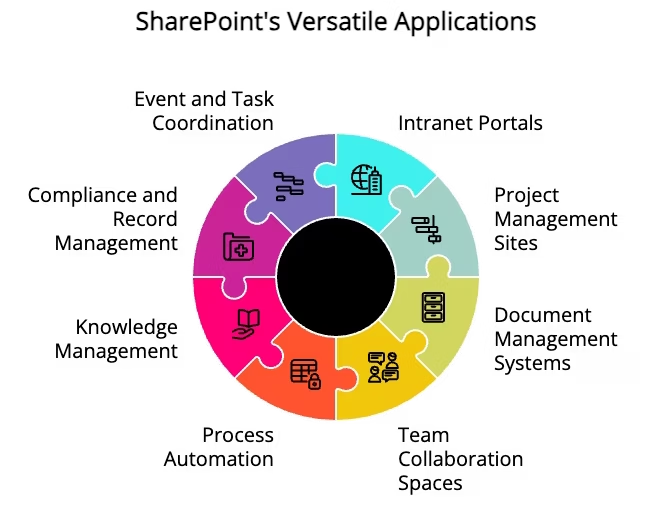
Intranet Portals
Create a central hub for company-wide announcements, policies, and resources.
Encourage employee engagement with newsfeeds, event calendars, and recognition pages.
Project Management Sites
Manage tasks, timelines, and project updates in a single location.
Use lists and document libraries to track project deliverables and share resources.
Document Management Systems (DMS)
Store, organise, and manage critical business documents.
Leverage version control to ensure everyone is working on the latest file.
Team Collaboration Spaces
Provide teams with dedicated workspaces for sharing files, ideas, and updates.
Integrate with Teams for seamless collaboration.
Process Automation
Automate repetitive workflows like leave requests, expense approvals, or document reviews.
Use Power Automate to extend SharePoint’s automation capabilities.
Knowledge Management
Build a repository of training materials, guides, and best practices.
Enhance searchability with metadata and tags.
Compliance and Record Management
Maintain regulatory compliance by managing sensitive documents with permissions and retention policies.
Use audit logs to track activity and ensure accountability.
Event and Task Coordination
Schedule events, assign tasks, and track progress with integrated tools like calendars and lists.A Beginner’s Learning Path for SharePoint
To help you get started with SharePoint, here’s a step-by-step learning path:
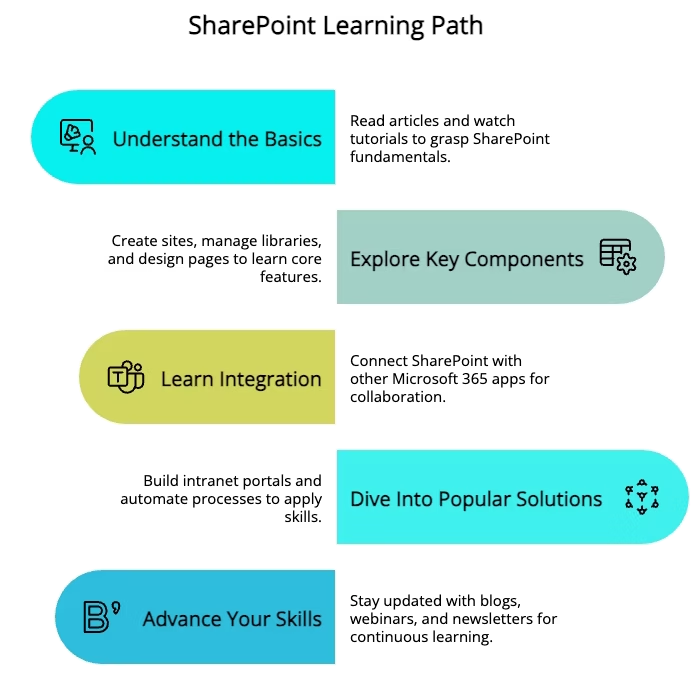
Understand the Basics
Read introductory articles and watch beginner-friendly tutorials.
Familiarise yourself with the SharePoint interface and navigation.
Explore the purpose of SharePoint, including how organisations use it for intranets, document management, and collaboration.
Explore Key components
Create a SharePoint site and experiment with different site templates to learn their features.
Set up and manage document libraries, including adding, organising, and sharing files.
Create and customise lists for tracking tasks, events, or data.
Design pages with web parts to display news, reports, and other content.
Implement metadata and create custom views to improve organisation and search functionality.
Learn Integration
Connect SharePoint to Microsoft Teams to create a collaborative workspace with shared files.
Sync SharePoint document libraries with OneDrive for offline access.
Explore integration options with other Microsoft 365 apps like Planner, Power BI, and Outlook.
Dive Into Popular Solutions
Build a basic intranet portal, including a homepage with links to key resources and tools.
Create a project management site with task lists, document libraries, and calendar web parts.
Automate simple processes using built-in workflows or Power Automate to streamline approvals or notifications.
Advance Your Skills
Stay Updated
Follow SharePoint blogs (like mine) and forums for expert advice and solutions to common challenges.
Attend webinars or Microsoft events to learn about new features and updates.
Subscribe to newsletters or YouTube channels focused on SharePoint best practices and tips.
Ready to build confidence fast? SharePoint Essentials: 7 modules, no jargon.
hub.simplysharepoint.com/essentials-system
Start SharePoint Essentials
Hi, I’m Liza 👋
I’ve been working with SharePoint for nearly two decades, across consulting and in-house roles, helping organisations design, clean up, and scale their Microsoft 365 environments.
My focus is information architecture — the unglamorous but critical layer that determines whether search works, governance sticks, and tools like Copilot help… or quietly make things worse.
Through Simply SharePoint, I share practical, real-world guidance on structuring libraries, designing metadata, managing permissions, and fixing the kinds of issues that naming conventions, policies, and “best practice” slides never really solve.
Everything here is based on how SharePoint is actually used — not how we wish it was used — with a strong emphasis on foundations that scale and hold up in the AI era.